Escape The Matrix MatrixOS Desktop — Boot, Icons, and the Solo Save
How the fake OS frames Escape The Matrix: first icons, autosave behavior, Mom-is-watching flavor, and why UI patches break scripts.
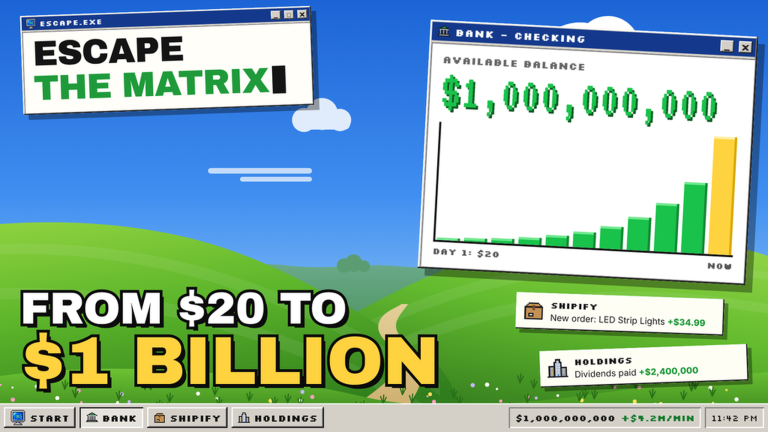
MatrixOS is not a side theme in Escape The Matrix—it is the whole interface metaphor. You are kicked out with $20 and an old PC, you boot a satirical desktop, and every hustle looks like an app. Understanding that desktop is the difference between a calm first hour and rage-clicking scam icons. This guide covers the boot/desktop metaphor, what early icons usually represent, how solo autosave behaves, where gigs/codes/settings conceptually live, the Mom is watching flavor without inventing quests, and why UI patches break automation.
For a full day-one checklist, pair this page with Getting Started. For the early printer itself, see HustleHub gigs.
The boot metaphor
Treat join → desktop the way you would treat a real cold start:
- Launch the official experience.
- Wait through loading until the MatrixOS shell is actually interactive.
- Only then open hustle apps.
Clicking during a black or half-drawn frame wastes time and confuses new players into thinking payouts are broken. The game released 13 October 2026 as a max players 1 incremental by Xdeyfa; there is no teammate to tell you the OS finished loading. Patience on boot is a skill.
Once the desktop settles, you should see a workspace that sells the “old PC” fantasy: limited-looking tools, loud money apps, and pressure to hustle immediately. That pressure is intentional satire, not a speedrun timer you must obey.
First icons — conceptual map
Exact labels can shift after patches, so think in roles rather than memorizing one screenshot forever:
| Conceptual icon / panel | What players use it for |
|---|---|
| HustleHub / gigs entry | Tagging, proofreading, scam detection, ~15s cooldowns |
| Business / market apps | Dropshipping, stocks, crypto, game dev, reselling, influencer desks |
| Store / Holdings panels | Mid-late upgrades after the November 2026 theme |
| Settings / system-style windows | Options players hunt for codes, audio, or account-facing toggles |
| Story / home flavor surfaces | Mom-is-watching tone and ending-adjacent pressure |
Early rule: master the gig icon before you trust every market tile. Official copy still says most paths are scams and only some work. The desktop will not politely gray out the traps.
Solo autosave behavior
Escape The Matrix is built for one player and progress saves automatically. Practical habits:
- Finish a gig submit before long alt-tabs when you can.
- Glance at cash and any Holdings/store progress at session end.
- Do not assume a second player can “hold your shop”—servers cap at 1.
- Treat rejoin as resume, not as a wipe, unless you deliberately reset for ending labs.
Autosave is why code redeems (when they exist), upgrade buys, and scam losses stick. It is also why you should not experiment with your only valuable Roblox account on high-risk tools.
Where gigs, codes, and settings usually live
Conceptually:
- Gigs live inside the HustleHub-style app on the desktop—the reliable early ATM with product tagging near $7 for perfect 6/6, partial proofreading pays, and scam-detection drills.
- Codes, when Xdeyfa ships any, typically sit in a settings, shop, or promo-style window after MatrixOS is up. As of mid-November 2026 there are still no verified active codes—see the Codes Hub.
- Settings are the sober panels people open when looking for redeem fields, volume, or clarity after a confusing market popup.
If a YouTube thumbnail claims a “secret desktop code app” without a string that redeems in your build, ignore it. MatrixOS already gives you enough lying UI without off-platform generators.
Mom is watching — flavor, not a fake quest log
The recurring line Mom is watching is tone: surveillance, guilt, and hustle pressure while you click shady surveys on a beat-up PC. This wiki does not invent Mom quests, timers, or checklist objectives that are not established elsewhere. Use the flavor as:
- A reminder to stay skeptical of “guaranteed” wealth apps
- Social meme energy when someone falls for an obvious trap
- Soft story pressure that can matter for endings without needing a fabricated Mom skill tree
If a guide online lists elaborate Mom fetch quests with no reproducible desktop steps, treat it as fanfiction until you can do it in your own solo save.
Why UI patches break scripts
Automation tools like community Auto Gigs hook buttons and cooldowns on the MatrixOS shell. When Xdeyfa moves panels, renames windows, or tweaks gig flow, selectors fail. That is normal—not proof the whole economy died.
After any patch:
- Boot MatrixOS fully before attaching an executor.
- Complete one tagging gig by hand; confirm payouts.
- Only then decide whether Auto Gigs still works (ban risk remains).
- Read Updates for the player-facing theme—Holdings/store upgrades around November 2026, plus observed activity spikes around 7–8 November.
Retests around 11 November 2026 still showed Auto Gigs as the main script family: tagging $7 for 6/6, proofreading roughly $4 for imperfect 2/3-style results, ~15s cooldown waiting, Stop control, and RightControl hub toggle. Loadstrings exist in the wild; this wiki will not paste malware-looking extras, and ban risk is unchanged.
Desktop habits that actually help
- Wait for a clean boot every session.
- Keep HustleHub as your floor even after Holdings unlock.
- Open one new business app at a time with a tiny test budget.
- Screenshot confusing scam copy for your own notes.
- Recheck icon layout after updates instead of playing from memory.
- Use scripts docs only if you accept account risk; never as a substitute for reading the desktop.
Related pages
- Getting Started — first-hour checklist on top of this desktop map
- HustleHub gigs — payout mastery inside the gig app
- Codes Hub — honest promo status (none verified mid-November 2026)
- Auto Gigs — automation details and limits
- Updates Hub — launch, Holdings theme, and patch checklist
Closing advice
MatrixOS is the joke and the tutorial at once. Players who win the long climb treat the desktop like a hostile OS install: boot patiently, open the honest tools first, assume many icons lie, and relearn the layout after patches. Mom may be watching—but your autosave only records what you actually clicked.
Frequently Asked Questions
Quick answers about gigs, codes, MatrixOS, and endings.
What is MatrixOS in Escape The Matrix?
MatrixOS is the satirical desktop interface you boot into after joining. Gigs, businesses, settings-style panels, and upgrade windows all present like apps on an old PC.
Why should I wait before clicking desktop icons?
The shell needs to finish loading. Clicking during a half-drawn boot wastes time and can make payouts or menus look broken when they are only not ready yet.
Does progress save if I leave mid-session?
Yes—progress autosaves in this solo experience. Still try to finish a gig submit cleanly before long breaks when you can.
Where do I redeem codes on MatrixOS?
When codes exist, they usually sit in a settings, shop, or promo-style window after the desktop loads. As of mid-November 2026 there are no verified active codes.
Why did my Auto Gigs script break after an update?
MatrixOS UI changes move the buttons scripts click. Boot manually, test one gig by hand, then recheck the Auto Gigs guide after authors update their loadstring.
Is “Mom is watching” a full questline?
It is recurring flavor about surveillance and hustle pressure. Do not trust invented Mom fetch-quest lists unless you can reproduce the steps in your own save.